Coming soon to spo-comm: Ultra-compact mini PC with TPM 2.0
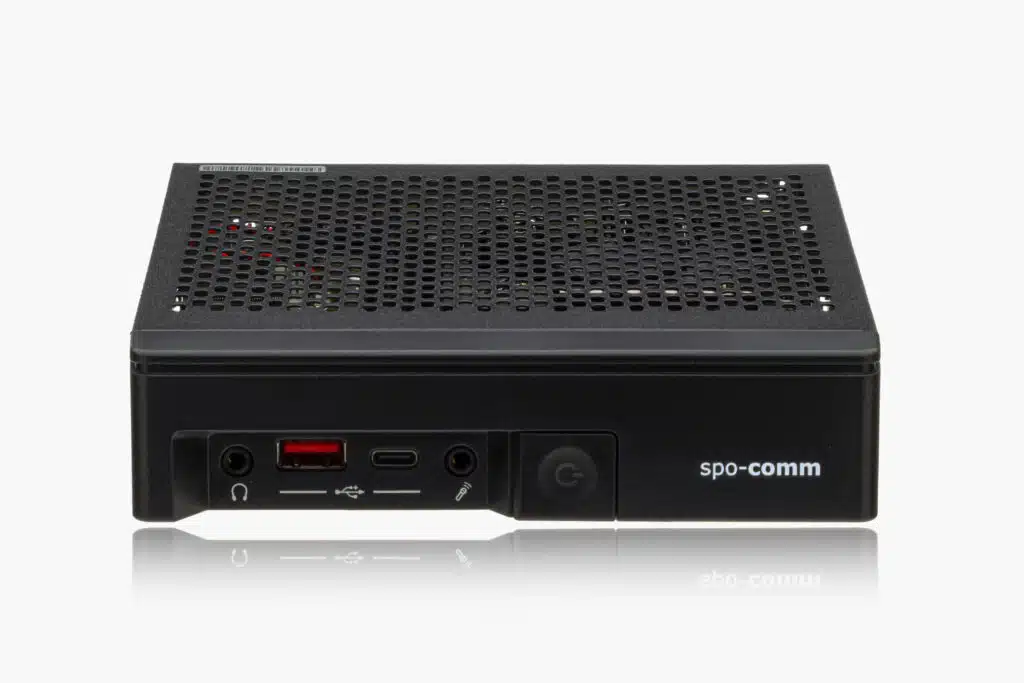
We’ll soon be expanding our product lineup with a new ultra-compact mini PC. We don’t want to give too much away just yet, but here’s what we can say: The system comes equipped with a powerful processor, modern interfaces, and DDR5 memory. In addition to TPM 2.0, the mini PC offers an extended temperature range from -20°C to +70°C, as well as an attractive entry-level price. Which product category might the new system belong to, given that it manages to pack all these features into a volume of less than one liter?
Better purchasing terms for us—lower prices for our customers
Everyone working in the IT sector has likely noticed the tight market conditions of recent months. These were primarily caused by rising component costs.
We are therefore all the more pleased to be able to offer our customers more attractive prices on select mini-PCs from our product line—with the same high quality, of course.
Thanks to improved purchasing terms, we’re able to lower the starting prices on some systems—and we’re very happy to pass this benefit on to our customers.
Artificial intelligence has long been part of our daily work—including at spo-comm. We use AI strategically as a support tool, for example, in copywriting. However, the final decision always rests with humans. We also clearly label AI-generated images. And when you call spo-comm, you’ll of course continue to speak with real people. We’ll soon explain in more detail exactly how we use AI and what role it plays at our company in a separate blog post.
WHATS NEW in March and April at spo-comm can be read here:
Renewed DIN EN ISO 9001:2015 certificate for spo-comm
Especially in industrial applications, where our mini PCs often have to run reliably for many years, structured processes and carefully tested quality standards are crucial. ISO 9001 forms an essential basis for this.
The renewed certification confirms our claim to develop and produce high-quality industrial PCs with defined processes, reliable quality and continuous improvement. All this in combination with our consulting services, testing options, customization and our in-house service team is what sets spo-comm apart! Because quality is not a coincidence, but a continuous process.
Customizing on a new level
At spo-comm, we always want to provide the best possible support for your projects and make them possible. Software customizations such as IoT image customization, individual image creation or installation and BIOS customizations are only the basics of our possibilities. We can also make further customizations in the form of additional interfaces or components for some of our products on request.
NEW – Project support from the idea to the finished product. If you have not found a suitable system for your application in our portfolio, you can now use the form to provide us with the key data you need for your project. We will then carry out some research and try to achieve the best possible result for you. The computers are carefully put through their paces and are only passed on to our customers once they have passed the test runs.
Find out more about customizing, prices, options and product development here:
One of our entry-level PCs is leaving our product portfolio.
Alternatives to the ONE i5 are the ONE H610 and the ONE J6412 – both are ideal for price-sensitive application scenarios that do not require high-performance hardware but still value stable and efficient computing power.
The ONE H610 is ideal for digital signage applications or as a thin client. It impresses with 3 video outputs, Intel Core i3, i5 or i7 processor, as well as an optional 4G module and space-saving design.
Our ONE J6412 shines with the Intel Celeron J6412 processor, passive cooling, integrated WiFi and two screen outputs with 4K resolution each, as well as the smallest dimensions of just 30 x 116 x 107 mm.
BOX C475 – Industrial PC for digital signage and IoT
The BOX C475 is also End of Life.
Alternatively, the BOX J6412 can be used, which also impresses with its passive cooling and small dimensions. It is also equipped with an Intel Celeron J6412 processor, two video outputs with up to 4K and optional WiFi.
Pssst: But what we can already reveal: A worthy successor to the BOX J6412 will also be joining our product portfolio in the near future and it could be called the N150.
Windows IoT Enterprise is the embedded version of Windows and is specially designed for industrial application scenarios. It is based on the familiar Windows desktop and supports classic applications (Win32), allowing it to be seamlessly integrated into existing IT infrastructures.
In contrast to classic Windows versions, IoT Enterprise was developed for dedicated devices with a clearly defined purpose – for example in production, retail or logistics. Typical areas of application are:
A central component of Windows IoT Enterprise is the LTSC model (Long-Term Servicing Channel). This brings decisive advantages for companies:
Long-term stability and predictability
Up to 10 years of support with security and quality updates
No disruptive function updates
High compatibility for existing applications
This is a decisive factor, especially in industrial environments where systems often have to run unchanged for many years. Windows IoT offers all the functions of Windows Professional, extended embedded features and a high degree of flexibility in use and integration, plus it can be used internationally thanks to the Multilingual User Interface (MUI) with several language packages.
A key advantage of Windows IoT Enterprise is its extensive customizability thanks to lockdown features. Lockdown describes the targeted restriction of the system to a specific function. This reduces the user interface, simplifies operation and increases security.
Important customizing functions:
Unbranded Boot: Removes Windows logos and system messages Embedded Logon: Automatic login without user interaction Shell Launcher: Launch of a defined application instead of desktop Assigned Access: Use of only one app possible
These functions allow the operating system to become completely “invisible” and only the desired application is visible.
In addition, OEM information such as logos or support data can be integrated, making it ideal for branding and OEM solutions.
Windows 10 & 11 IoT Enterprise combine the advantages of a proven operating system with the requirements of modern industrial applications:
Long-term stability through LTSC
Extensive customizing options
Enterprise-level security
Flexible licensing
This makes Windows IoT Enterprise the perfect choice for (almost) all companies that need reliable, secure and customized systems. It only gets better when the customized operating system finds its place in your application on our spo-comm Mini-PCs!
Do you need advice on Windows IoT or one of our products? Then don’t hesitate to contact us or book a consultation directly!
The Windows IoT Enterprise license is based on the hardware and the intended use of the device. Microsoft divides the systems into different price categories, which are referred to internally as SKUs (Stock Keeping Units).
OEM licensing & activation – ideal for dedicated devices
Windows IoT Enterprise is consistently designed for use in dedicated devices. This is why licensing is usually carried out via authorized OEM partners. For you, this means that you receive a pre-installed and optimally tuned system that is ready for immediate use.
The license is firmly linked to the hardware. This not only ensures clarity of use, but also greater security and stability during operation. This close integration of hardware and software is a decisive advantage, especially for industrial applications or long-lasting devices.
Activation is also designed for maximum simplicity. Using the OEM Activation 3.0 (OA3) established by Microsoft, the license key is stored directly in the BIOS or UEFI of the device. The operating system is then activated automatically – without any manual effort.
For our customers, this means: Less administration work, less susceptibility to errors and smooth operation throughout the entire life cycle.
Regardless of the license class, manufacturers usually rely on Windows IoT LTSC, why? Quite simply because of the long-term security updates, a stable platform for years to come and the predictable lifecycle for industrial devices. Windows 10 IoT Enterprise LTSC 2021 and Windows 11 IoT Enterprise LTSC 2024 are therefore ideal for devices that will remain in use for a long time.
If you are not sure whether Windows IoT Enterprise is right for you and your application, we can provide you with a free trial of the desired PC with a Windows IoT test version at any time. If you have any questions about the compatibility of different Windows versions with our systems, please do not hesitate to contact us!
Modern IoT and embedded devices are increasingly exposed to attacks, both via networks and locally. Windows IoT Enterprise LTSC protects devices through a combination of hardware and software mechanisms that have been specially developed for industrial requirements.
Device safety
Secure Boot
Secure Boot ensures that only certified software is loaded at system startup. Unauthorized applications or manipulations to the boot process are blocked.
Device Guard / Application Control
This function allows only trusted applications to be executed. This prevents malware or unwanted programs from running on the device.
Advanced Lockdown:
Mainly describes the function of tailoring your Windows operating system to your needs through specific restrictions (see also our article on customizing). At the same time, this also means an increased security factor for your operating system. For example, Advanced Lockdown offers you the option of only allowing certain programs to perform operations on your computer. Conversely, this means that unwanted malware or software is not given the opportunity to nest in your PC in the first place. How to Lockdownfeatures: MicrosoftLearn
The lockdown also includes the following security functions:
AppLocker:
As mentioned at the beginning, deactivate unwanted software/programs
Maintain control over all processes through your necessary consent
Shell Launcher:
Start automatically in a custom shell after logging in
Deactivate hotkeys and certain key combinations
Unified Write Filter:
Indispensable when it comes to write protection of hard disks. This means that the Unified Write Filter does not allow any changes to the hard disk and the files and programs stored there. Changes are only stored temporarily in the RAM memory. After restarting the operating system, everything is back to normal.
Mobile Device Management (MDM)
Deny USB and other peripheral devices access to your computer
Data security
Trusted Platform Modules (TPM):
A TPM is a chip integrated into many systems that makes it possible to encrypt the hard disk. The TPM also makes it possible to identify any hardware in the system. This also enables the chip to detect changes in the system.
BitLocker:
Encryption of your drives/hard disks. Also enables the secure deletion of data. This makes it much more difficult to recover deleted data (useful, for example, when discarding old computers).
Enterprise Data Protection (EDP):
EDP protects data from unwanted access or leaks, for example via cloud or email services.
Protection of the user identity
Windows HELLO:
Biometric login via fingerprint, face or iris enables secure and fast access.
Credential Guard:
Protects access data from malware and unauthorized access. This keeps company and customer data protected.
Conclusion
With Windows IoT Enterprise LTSC, users benefit from comprehensive device and data security combined with adaptability for industrial and IoT applications. The combination of Secure Boot, Device Guard, UWF, TPM, BitLocker and biometric login ensures the highest level of protection.
If you are not sure whether Windows IoT Enterprise is right for you and your application, we can provide you with a free trial of the desired PC with a Windows IoT test version at any time. If you have any questions about the compatibility of different Windows versions with our systems, please do not hesitate to contact us!
In this context, lockdown is not a journey back in time to 2020, but rather a Windows IoT operating system that can be adapted to your own needs with the help of targeted restrictions. In the following, we will explain the lockdown features that are used to customize the operating system. We explain the features that ensure greater security here.
What exactly does lockdown mean?
Lockdown describes the targeted restriction of the operating system. This is particularly important for single-function devices, i.e. devices that are only intended to perform a specific task, such as kiosk terminals, POS systems or digital signage players.
The lockdown mechanisms can be used to hide user interfaces, configure automatic processes and deactivate unwanted functions. This keeps the system stable and secure while the desired application runs in the foreground.
The most important lockdown features
Unbranded Boot
With Unbranded Boot, all Windows elements can be hidden at system startup, e.g:
Boot logo and status displays
Error messages (blue screen is optionally replaced by black screen)
Errors are logged in the background so that maintenance can be carried out easily. This feature ensures that users only see the desired application and at the same time protects the system from unwanted interventions.
Direct start of the main application after the boat
Devices can thus be configured so that they are immediately ready for operation without users seeing administrative functions.
Shell Launcher
The Shell Launcher allows a defined application to be started automatically instead of the Windows desktop. For example, a user account runs on a specific application shell or an administrator account keeps the classic desktop interface. You can also define how the system reacts to crashes, whether with a restart, shutdown or no action.
Assigned Access
Assigned Access extends the principle of the Shell Launcher and is particularly relevant for individual applications:
A user account may only use one selected app
Keyboard shortcuts, mouse gestures or the power button can be blocked
Breakout key enables controlled access to the system
This means that devices such as kiosk systems or POS terminals can be configured in a particularly secure and user-friendly way.
Customized OEM information
Another customizing feature is the adaptation of OEM information such as manufacturer name and model designation, the company logo or support information (phone number, website, service times). This allows devices to be fully adapted to the corporate branding, which is a major advantage in a professional environment.
Windows IoT Enterprise LTSC as the basis
The LTSC versions (Windows 10 IoT Enterprise LTSC 2021 and Windows 11 IoT Enterprise LTSC 2024) form the stable basis for these customizations. They offer long-term security updates, guarantee stability over many years and enable extensive customizing options without the risk of malfunctions.
If you are not sure whether Windows IoT Enterprise is right for you and your application, we can provide you with a free trial of the desired PC with a Windows IoT test version at any time.
Windows IoT Enterprise is an operating system for industrial applications and embedded PCs. It is suitable for all devices on which desktop apps and Win32 applications are to run. Windows IoT Enterprise has all the functions of the Windows Professional versions and also has so-called embedded lockdown features. These are used to secure the device and protect it from unwanted attacks. They also offer various branding options and can, for example, make the Windows operating system completely invisible behind the application. IoT also offers long-term support through the LTSC versions. The current versions are Windows 10 IoT Enterprise LTSC 2021 and Windows 11 IoT Enterprise LTSC 2024.
What advantages does Windows 10 IoT Enterprise offer?
Long-term stability
A major advantage of Windows IoT LTSC is the long-term support, consisting of security and quality updates over 10 years, no disruptive function updates that can destabilize systems and high compatibility for existing software.
This is crucial for devices that run for many years, such as production systems, kiosk systems or ATMs. Function updates only come every 2-3 years and are carefully tested to minimize risks.
Customization options and embedded features
Windows IoT Enterprise enables extensive customization:
Unbranded Boot: Hide boot logo or error messages
Shell Launcher: Open an application automatically after startup
Assigned Access: Configure devices for a single purpose
These lockdown mechanisms not only ensure user-friendliness, but also increase the security and stability of the system.
Multilingualism and internationality
Several language packages can be installed with MUI (Multilingual User Interface). This facilitates use in international projects and enables flexible language selection per user or location, as well as over 30 language packages (including regional variants).
License advantages
Another advantage is Windows IoT licensing. It is specially optimized for embedded systems, which saves costs and simplifies use on different devices. Devices can be licensed individually without losing features.
Who is Windows IoT Enterprise suitable for?
In principle, Windows 10 or 11 IoT is suitable for all industrial applications: From kiosk systems, POS devices and ATMs to production systems and industrial control systems to digital signage players or medical devices – to name just a few examples.
If you are not sure whether Windows IoT Enterprise is right for you and your application, we can provide you with a free trial of the desired PC with a Windows IoT test version at any time.
But let’s start at the beginning and address the question of why this operating system is now called Windows 10 IoT. First, a brief digression on the term “IoT”:
What does the term “IoT” mean?
IoT is short for “Internet of Things“. The term describes the idea that PCs will gradually disappear and be supplemented and replaced by smart objects (“things”). For the private sector, this means that everyday objects are being equipped with processors, sensors and transmitters. For example, refrigerators that reorder food themselves or an intelligent brushthat analyzes hair structure. But the topic of IoT is also, or rather especially, interesting for many sectors in the industrial sector. This is because embedded microdevices can be used to network production systems and shipping processes, among other things, and therefore work much more efficiently.
What does this mean for Windows 10 IoT?
Why has Microsoft now chosen the name Windows 10 IoT for its new embedded operating system? Well, for one thing, the term IoT is slowly becoming the talk of the town, so the term is not a bad idea for marketing reasons alone. On the other hand, Windows 10 IoT is part of the One Windows strategy. This means that there is one Windows for all devices – from small devices to servers. This is because Windows 10 IoT comes in three versions, which are differentiated according to device type: Windows 10 IoT Core for small devices such as Raspberry Pi, Windows 10 IoT Mobile Enterprise for smartphones and small tablets and Windows 10 IoT Enterprise for systems with a desktop shell and Win32 apps.
All three variants are based on the same core, to which different features are added for each device family. Thanks to the common core, the so-called universal apps can run on all platforms and device types, which significantly reduces and simplifies the effort required for development and support.
Of the three Windows IoT variants, we are only really interested in Windows 10 IoT Enterprise, as this is the version that runs on (mini) PCs and enables desktop apps and Win32 applications. Possible applications include areas such as POS, kiosk, digital signage, industrial control, production systems and ATMs.
WUXGA stands for Wide Ultra Extended Graphics Array and describes a resolution of 1920 × 1200 pixels in 16:10 format. A direct comparison with Full HD with 1920 × 1080 pixels is immediately noticeable: The additional height ensures more visible content. What sounds like a small difference on paper is surprisingly noticeable in everyday life. – chip.de
Why the aspect ratio makes the difference
The 16:9 format that is widely used today originally comes from the world of televisions and video content. It is ideal for films and series – but only to a limited extent for productive work. Documents, tables, technical drawings or web applications benefit significantly from more vertical space. This is exactly where WUXGA comes into play. The additional 120 pixels in height mean less scrolling, a better overview and an overall smoother working experience. Content appears more airy, text is easier to read and information remains in the field of vision for longer. This is a noticeable ergonomic advantage, especially during long working days at the display. – giga.de
WUXGA in professional and industrial use
WUXGA shows its strengths particularly in business, industrial and outdoor applications. Here it is less about entertainment and more about efficiency, clarity and reliability. Whether maintenance logs, ERP systems, shift schedules or technical documentation, all this content benefits from a display that offers more space without relying directly on energy-hungry ultra-high-resolution displays.
Another advantage lies in the balance between sharpness, performance and energy consumption. WUXGA offers a high pixel density on 10-inch displays, but remains resource-efficient. This has a positive effect on battery life, system stability and smooth operation, all factors that are crucial in mobile use.
A display format with real added value
WUXGA is not a marketing buzzword, but a sophisticated display format that has proven itself over the years. It combines high resolution with a practical aspect ratio, creating exactly the space that productive applications need. Anyone who works with digital content on a daily basis quickly realizes that it’s not just about sharpness, but also about clarity. WUXGA unfolds its full potential in combination with robust, powerful devices. Our RUGGED tablets show that this resolution is still a smart choice for anyone who values efficiency, reliability and a pleasant user experience.
WUXGA on spo-comm RUGGED tablets
For the reasons just mentioned, all our 10″ RUGGED tablets consistently use a WUXGA display. This ensures that our users can maintain a clear view even under demanding conditions. Every bit of information counts, especially in harsh working environments such as industry, warehouses, field service and service calls. The WUXGA display supports exactly that: clear presentation, sufficient space for complex content and comfortable readability regardless of the application.
Discover the variety of our RUGGED tablets and their accessories now. If you have any questions about the products or need help choosing the right spo-comm system, please do not hesitate to contact us!
Edge AI on the upswing: market trends, growth and profitability
As Gartner predicts, the majority of all corporate data processing now takes place outside central data centers, a clear indication of the growing importance of distributed intelligence at the edge of the network.
At the same time, market research is forecasting strong growth in the edge AI market. Studies by Fortune Business Insights and other analyses show that the market for AI-based edge solutions is expanding at high growth rates. Driven by the increasing demand for real-time processing, Industry 4.0 use cases such as autonomous production lines and predictive maintenance.
These facts are bringing the cost-benefit ratio of edge AI into the focus of IT specialists and management. Where is it worth running AI workloads and how quickly will investments in special hardware, such as mini PCs, pay off?
Cost components of edge and cloud
The economic evaluation of Edge AI often focuses on the comparison between investment costs and operating costs:
Cost factor
Cloud solution
Edge AI (local)
Investment
Low (devices minimal)
Mini PCs, local AI infrastructure
Operating costs
High cloud computing costs & data traffic
Low (hardly any cloud transfer)
Bandwidth costs*
High (large amounts of data in the cloud)
Low (data processing on site)
IT operation & maintenance
External costs & scaling
Local management, low data transfer
Data storage
Permanent storage in the cloud
Selective local storage, low storage requirements
*Costs incurred for the transfer of data volumes via networks (Internet, cloud services, hosting).
As a result, analyses show that local data processing at the edge can lead to a significant reduction in total operating costs in the long term. Especially where high volumes of data need to be continuously generated and analyzed.
ROI drivers: strategic advantages of edge AI
Latency & real-time response One of the biggest advantages of edge AI implementations is the reduced latency. Applications in manufacturing, robotics or autonomous systems require response times in the millisecond range. If data has to be sent to the cloud, delays occur that are intolerable for cycle times or safety functions. Local systems such as mini PCs process sensor data directly where it is generated, often delivering decision results in under 50 ms.
Predictive maintenance – less downtime, more productivity Predictive maintenance is one of the most important Industry 4.0 applications and is used by many companies to avoid unplanned downtime. Bitkom studies show that companies are already increasingly relying on AI-supported analyses to monitor machine statuses and proactively schedule maintenance, for example. Even if there are different figures for savings, the economic effect is clear: predictive algorithms can significantly reduce downtimes and maintenance costs, and even more efficiently if the analysis is carried out directly on edge systems instead of in the cloud.
Data security & data sovereignty An often underestimated advantage is control over sensitive company data. Edge AI users minimize the need to transfer raw data to third-party cloud infrastructures, which is a plus for data protection, compliance and data sovereignty, especially in regulated industries. Local data processing limits potential attack surfaces and facilitates compliance with company guidelines.
Using edge AI sustainably with the right industrial PCs
A good edge AI cost-benefit ratio is not only achieved through AI software, but also through the choice of suitable hardware. After all, investments only pay off quickly and sustainably if the edge infrastructure used is powerful, scalable and economical. In practice, our spo-comm solutions show how this balancing act can be achieved – from entry-level to sophisticated AI scenarios.
CORE 5 Ultra – Compact entry-level AI system
The CORE5 Ultra represents a robust and compact entry into industrial edge AI. With a modern Intel® Core™ Ultra processor and integrated NPU, this mini PC is ideal for basic inference and automation tasks directly at the data source. It processes sensor data locally and energy-efficiently without a permanent cloud connection and with minimal running costs.
NOVA R680E – Industrial PC with Nvidia GPU
The NOVA R680E offers the necessary performance and expandability for more demanding AI workloads, for example in image processing, predictive maintenance or complex production analyses. Thanks to more powerful CPU options and PCIe expansion options (e.g. GPU accelerator), this industrial PC is able to run compute-intensive models directly at the edge without any data traffic to the cloud and the associated running costs.
Thanks to our spo-comm hardware qualities, strategic advantages such as low latency times, higher data security and noticeable cost savings can be realized. These are all key components of a positive edge AI cost-benefit ratio and should not be neglected. In addition, local processing ensures that companies can react more quickly to production or quality deviations and therefore work more productively.
With the combination of technically mature systems such as the CORE 5 Ultra and the NOVA R680E in combination with a well thought-out Edge AI concept, companies are relying on a basis that is not only economically convincing, but also gives them the flexibility to implement future AI projects efficiently and with our support.